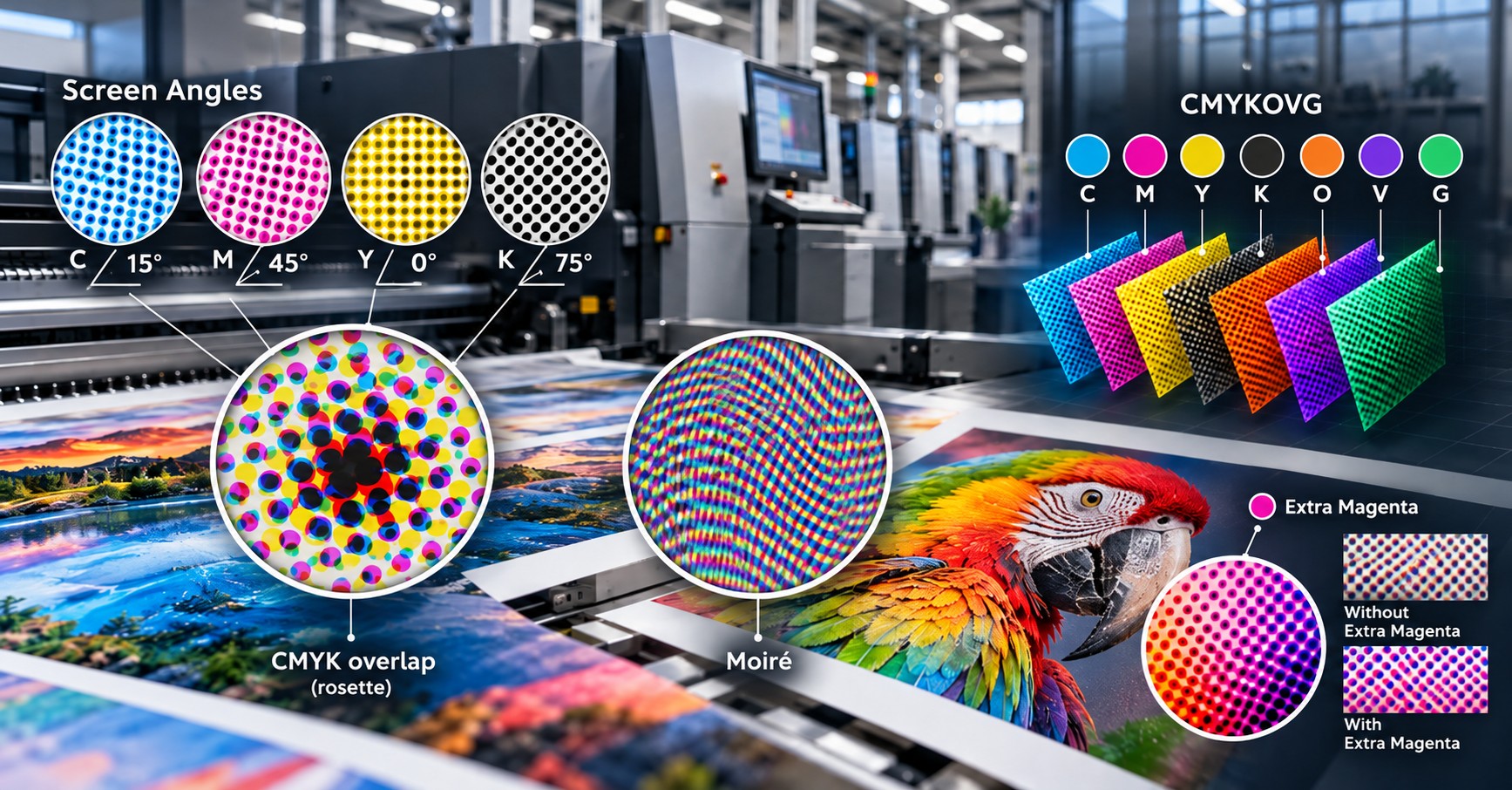
Why technically correct color separations can produce visually incorrect results—and how screening geometry, Extra Magenta, and resolution determine print quality.
A practical guide for press operators, production managers, color and application specialists, and packaging developers.
TECHNICAL SCOPE
CONVENTIONAL PRINTING | SEVEN-COLOR PRINTING | PROCESS CONTROL |
|---|---|---|
CMYK plus a premixed spot ink | CMYK + Orange, Violet, Green (OVG) | Screen angle, LPI, DPI, RIP, M1 |
Introduction
A printing press is calibrated, the ink densities are within specification, and spectral measurements confirm the target colors. Yet a printed package exhibits waves, stripes, or a repeating texture. The defect may appear only in a red-orange brand color, a violet transition, a dark green field, or a large uniform background.
The cause is not always ink transfer, calibration, or color formulation. Often the decisive factor is how halftone dots from different color separations are positioned relative to one another. When their periodic patterns interact unfavorably, moiré becomes visible even if every individual separation looks correct.
This article explains the geometry of amplitude-modulated screening, why angle separation matters, what changes when a four-color process is extended to CMYKOVG, and how an additional Magenta separation—Extra Magenta (M1)—can resolve a specific class of overlap problems. It also explains why changes in dots per inch (DPI) or lines per inch (LPI) do not automatically prescribe new screen angles.
01 How halftone screening creates tone
A solid ink area covers the substrate. To reproduce a lighter tint without reformulating the ink, the press reproduces small ink dots separated by uncovered substrate. A low nominal tint produces relatively small dots; a high tint produces larger dots, which may eventually connect.
In amplitude-modulated (AM) screening, dot centers follow a periodic grid, and tonal value is controlled mainly by dot area or shape. When the printed image is viewed from its intended distance, the human visual system integrates those patterns into perceived continuous tones.
Each active ink separation has a screen. In a multicolor overprint, the resulting appearance depends not only on each screen individually but also on the spatial relationship between them.
02 What a screen angle means
A screen angle is the orientation of the periodic halftone-dot lattice relative to a reference axis. A 0° screen follows the reference direction; a 45° screen is diagonal; a 75° screen uses another lattice orientation.
Screen angle does not describe the direction of substrate travel, the orientation of an anilox roll, the angle of a laser beam, or the viewing angle of the finished package. It is a geometric property of the rendered dot pattern.
Why not use one angle for every color?
Screens with identical or nearly identical orientation and frequency may interact in ways that create a conspicuous secondary pattern. They can also be deliberately registered and compatible in some systems, so identical angles do not inevitably cause moiré. The risk arises when relative phase, frequency, geometry, and superposition combine unfavorably.
By assigning suitable orientations to the principal screens, a screening system distributes their periodic structures and reduces visible low-frequency interference. The objective is not to eliminate all overlap—color printing depends on overlap—but to control its structure.
03 The 15°–45°–75° CMYK arrangement
A valid and widely used four-color angular assignment is shown below. It is the reference arrangement for discussing the shared 45° angle used in a particular seven-color screening approach.
Example A | CMYK screen-angle assignment
Color separation | Nominal angle |
|---|---|
Cyan (C) | 15° |
Magenta (M) | 45° |
Yellow (Y) | 0° |
Black (K) | 75° |
Here, the principal C, M, and K lattices have successive nominal separations of 30°. C to M is 30°, and M to K is 30°. In a suitably symmetric square-dot lattice, equivalent orientations repeat every 90°, so 15° is geometrically equivalent to 105° and the complementary separation from 75° is again 30°.
Why is Yellow often placed at 0°?
Yellow screens are generally less visually conspicuous than darker ink screens. A four-color periodic system cannot give all four colors independent 30° separations within a 90° orientation period. A practical arrangement places Yellow closer—often about 15°—to one of the other screens while preserving larger separations among the more visually prominent channels.
Must Black be at 45°?
No. Another established arrangement uses C=15°, M=75°, Y=0°, K=45°. In that configuration, Black is assigned the diagonal direction. Both approaches can be valid when dot shape, lattice symmetry, RIP implementation, and color separations are designed together. The familiar 30° rule is not a universal prescription for all elliptical-dot, frequency-modulated, or hybrid screens.
04 Moiré: an interference pattern, not necessarily a press defect
Moiré is a visible secondary pattern produced by superimposing two or more periodic structures. Two sets of fine lines placed at a slight angle can produce broad bands even though neither original set contains those bands. Halftone-dot screens can behave similarly.
A small flower-like pattern produced by a controlled interaction of several CMYK screens is called a rosette. Rosettes are normal features of many periodic AM systems when sufficiently fine and uniform. Moiré becomes a production defect when the combined pattern is coarse or conspicuous enough to disturb a field, gradation, or image detail.
Typical symptoms include diagonal ripples, wavy lines, rings, repetitive light–dark areas, or inconsistent texture within otherwise even color fields. Not every repeating band is moiré: mechanical banding, transfer instability, and other production defects can look similar.
05 What else can cause moiré?
Problematic screen-angle relationships are one possible cause, but frequency mismatches, source image patterns, or additional periodic structures can also introduce interference.
- Reproduction of a previously halftoned print without adequate descreening can superimpose the original raster and the new output raster.
- Fine fabrics, window grids, stripes, and mesh patterns in photographs can interfere with the output screen.
- Changing RIP algorithms, dot shapes, or screen frequencies can create a different pattern even if the nominal angle remains similar.
- A periodic substrate texture or a mechanical ink-transfer pattern can combine with the image raster in a process-dependent way.
For troubleshooting, first determine whether the defect exists in the rasterized separations or appears only after physical printing.
06 Premixed spot colors versus seven-color reproduction
Conventional CMYK plus a premixed spot ink
In a conventional workflow, a brand color outside the required CMYK tolerance may be supplied as a separately formulated, premixed spot ink and printed in an additional color unit. A 100% solid spot-color area does not require that brand hue to be synthesized from overlapping CMYK halftones. If the spot ink is screened below 100% or overprinted with process inks, however, you must still consider its own screen.
Liquid electrophotography with CMYKOVG
An expanded-gamut workflow may use a fixed seven-ink set: Cyan, Magenta, Yellow, Black, Orange, Violet, and Green. Orange, Violet, and Green expand the available color gamut, enabling more brand colors to be reproduced through digital process separations rather than a new premixed ink for every job.
An orange-red target may use Orange together with Magenta; a violet target may use Violet with other process channels; and a saturated green may make use of Green. Actual channel allocation depends on the color-separation strategy, measured press characterization, and the target color. Seven inks do not mean that seven screened separations overlap everywhere.
Expanded-gamut printing is not exclusive to liquid electrophotography (LEP); conventional processes can also implement extended ink sets. The contrast is between premixed spot-color production and process-color reconstruction, not an absolute limitation of any single printing technology. Metallic, fluorescent, and other special-effect inks cannot automatically be simulated by CMYKOVG.
07 Why seven inks challenge conventional angle allocation
Within a repeating angular interval, there is limited room for mutually separated periodic screen directions. Adding Orange, Violet, and Green therefore requires more than copying a four-color angle table and assigning arbitrary new angles.
A seven-color system may reuse certain angles, constrain which channels overlap within a given hue, divide one ink into alternative raster separations, or use a dedicated multicolor screening algorithm. These choices must be coordinated with the separation engine and press characterization.
An angle-sharing arrangement is effective only when the overlapping channels are controlled. A particularly important exception occurs when Magenta must coexist with an OVG channel that uses the same screen orientation.
08 A shared 45° angle for Magenta and OVG
In one seven-color AM screening strategy, the OVG channels share the nominal angle assigned to Magenta. When that Magenta angle is 45°, an illustrative assignment is:
Example B | Seven-ink screen-angle sharing
Ink/channel | Illustrative angle |
|---|---|
Cyan | 15° |
Magenta | 45° |
Yellow | 0° |
Black | 75° |
Orange | 45° |
Violet | 45° |
Green | 45° |
This is a configuration example—not a universal specification for all LEP presses or all seven-color screening modes. Different modes may use other assignments, frequencies, dot geometries, or overlap-management strategies.
The shared orientation solves an angle-allocation problem, but creates a new dependency: if Magenta and any of O, V, or G are both needed in the same image area, their periodic grids may interact. Identical nominal angles do not guarantee a visible defect, but they require screening and separation rules that control the interaction.
09 When a brand color requires Magenta plus OVG
Consider a red-orange brand color reproduced by both Magenta and Orange. If both use a 45° periodic screen with similar spatial frequency, their interaction may produce a visible ripple in an otherwise uniform solid-looking area. The same principle can matter for Magenta combined with Violet or Green, where the actual color separation uses both channels.
This is not automatically a color-formulation problem. Spectral measurements may confirm an accurate hue while the texture remains unacceptable. Changing ink density or the intended Magenta–Orange balance can move the printed color away from target without addressing the raster geometry.
The first diagnostic question is therefore: which separations are actually active in the defective region, and what screening strategy was used for their overlap?
10 Extra Magenta (M1): a second raster separation of the same ink
One engineered solution is Extra Magenta, also called Magenta 1 or M1. It is not a new physical ink color, nor does it turn CMYKOVG into an eight-color ink set. Instead, M1 is an additional digital separation that uses the same Magenta ink but enables a different screened treatment for selected image regions.
How the separation works
The separation workflow identifies areas in which Magenta would overlap with Orange, Violet, or Green under an angle-sharing mode. Instead of routing all Magenta tone data through a single separation, the system directs the relevant portion to an alternate Magenta raster whose angle and screening characteristics match the full configuration.
For example, rather than screen both Magenta and Orange at 45° in a critical region, Orange may remain on its approved screen while the appropriate Magenta contribution is assigned to M1 at a different approved angle. The exact M1 angle is mode-dependent; it should not be chosen independently or inferred from a four-color table.
The outcome is a more favorable spatial relationship between the active screens without requiring a different Magenta ink formulation.
Does M1 increase ink consumption or press clicks?
M1 does not introduce a new ink type. Depending on how the press executes screened separations, however, it may require an additional image-development or transfer cycle—sometimes described operationally as an extra click. Whether that occurs, and its effect on productivity or cost, depends on the architecture and the selected production mode.
The engineering trade-off is quality and predictable screening against a possible increase in processing time or production cost.
11 When Extra Magenta is not required
M1 is not a mandatory feature of every CMYKOVG job. Some multicolor screening modes use a purpose-built angle/frequency structure or a different channel-allocation strategy that avoids the problematic interaction without adding a Magenta separation.
A job created for an M1-enabled workflow should not have M1 discarded as an unnecessary duplicate. Likewise, an M1-free screening mode must use color separations and profiles built and approved for that mode. Mixing the separation strategy of one mode with the screens of another can alter both color and texture.
Before printing, confirm the intended screening mode, the actual number of raster separations, and whether the receiving workflow can handle all defined channels.
12 Why not rotate Orange or Violet manually?
A screen-angle set is designed as a system. Changing Orange alone may solve a Magenta–Orange interaction while introducing a different interaction with Cyan, Black, or another extra-gamut channel. It can also change rosette structure and tonal response.
Therefore, corrective action should follow a validated screening mode or an approved separation strategy rather than an arbitrary manual angle change. M1 is one example of changing channel allocation instead of destabilizing the entire screen architecture.
13 A second documented LEP screen configuration
A separate supplied worksheet records another CMYK screening mode, summarized below. This configuration differs from the illustrative 15°/45°/75° system described earlier.
Example C | Source worksheet: another CMYK screening mode
Ink | Screen ruling | Screen angle |
|---|---|---|
Cyan | 172 LPI | 15° |
Magenta | 175 LPI | 74° |
Yellow | 192 LPI | 0° |
Black | 175 LPI | 43° |
Its principal angles are spaced 28° between Cyan and Black, 31° between Black and Magenta, and an equivalent complementary 31° within a 90° symmetric orientation period. These are close to the familiar nominal 30° distribution but not identical.
The worksheet also shows unequal screen rulings: Cyan at 172 LPI; Magenta and Black at 175 LPI; Yellow at 192 LPI. These differences may be part of deliberate digital screening optimization, but the worksheet alone cannot explain why a particular value was selected.
Crucially, this worksheet does not specify screen angles for Orange, Violet, Green, or M1. Those values must not be invented or inferred from the four recorded CMYK rows.
14 DPI, LPI, and PPI are different quantities
Three resolution terms are regularly confused. Lines per inch (LPI) refers to the spatial frequency of a periodic halftone screen. Dots per inch (DPI), in this context, describes the addressable positions of the rendering or exposure device. Pixels per inch (PPI) describes source-image pixel density at a particular reproduction size.
A 300 PPI image can be rendered to a 175 LPI halftone by a device offering substantially finer addressability. The PPI specifies the detail in the input raster; the LPI specifies the printed halftone ruling; the device DPI specifies the grid on which that pattern can be implemented.
They interact, but neither is interchangeable with the other, and neither guarantees final image quality on its own.
15 What changes when LPI increases or decreases?
Higher LPI produces a finer periodic screen with smaller spacing between dot centers. It can improve apparent smoothness and fine-detail rendering if the press, ink, and substrate can consistently reproduce the required dot structures.
For example, a 175 LPI grid has a nominal pitch of approximately 0.145 mm, while 200 LPI corresponds to approximately 0.127 mm. The reduction is real, but it can make highlight dots less robust and shadow dots more prone to joining under unsuitable conditions.
Lower LPI makes the pattern coarser and more visible, but may provide more stable dot transfer on difficult substrates. The finest available ruling is therefore not always the best production choice. Evaluate highlight retention, shadow separation, substrate texture, tonal response, and intended viewing distance.
16 Does changing DPI force the screen angle to change?
No. Angle and screen frequency are distinct geometric parameters. A nominal 45° screen can be specified at different line rulings; likewise, a given ruling can be produced with different angles. A digital rendering engine, however, must approximate the requested geometry on a finite address grid.
An illustrative device working at 2400 DPI has the following ratios of address resolution to periodic screen ruling:
Screen ruling | DPI ÷ LPI | Interpretation |
|---|---|---|
150 LPI | 16.0 | About 16 address intervals per nominal screen-cell dimension |
175 LPI | 13.7 | Fewer intervals at the same device addressability |
200 LPI | 12.0 | Fewer intervals again; demands careful dot construction |
These figures illustrate the basic relationship; they do not fully describe multilevel imaging, screen supercells, sophisticated RIP algorithms, or the number of achievable tone steps.
Increasing device DPI
More addressable points can more closely approximate angle, ruling, and dot shape, depending on the screening engine. The nominal angle need not change.
Reducing device DPI
With the LPI held constant, fewer address positions are available per nominal screen-cell dimension. Some systems may then require a different approximation or alter their dot structures, but an angle change isn't mathematically required.
Why do angles sometimes change with a print-resolution setting?
In many presses, a resolution or quality preset switches to a different complete screening mode. That preset may also change LPI, nominal angles, dot shapes, or channel allocation. This is a screening-system decision—not an automatic mathematical consequence of changing DPI alone.
17 Why Yellow may use a higher LPI
In the supplied alternate mode, Yellow uses 192 LPI while Magenta and Black use 175 LPI. The increase is approximately 9.7%. The finer Yellow pattern and unequal frequency relationships can affect visual texture and possible interference between screens.
Because Yellow halftone dots are generally less visually conspicuous, screening engineers may have more freedom to adjust their ruling. However, the reason for the particular 192 LPI choice cannot be established from the worksheet alone, and no universal rule requires Yellow to have the highest LPI.
Operators should avoid changing a single channel ruling without checking the approved screening mode and its calibration.
18 Why screening changes can shift the measured color
Screening is geometric, but its consequences are also colorimetric. Changes in dot size, screen frequency, dot shape, or transfer behavior can alter each ink's effective tonal response.
Tone value increase (TVI) describes the difference between nominal tone and measured printed tone under defined measurement conditions. Different screening modes can change highlight, midtone, and shadow behavior, as well as optical interaction between overprinted inks.
For CMYKOVG work, the separation profile is usually tied to a specific characterized production condition. Switching screening modes without recalibration or validation can therefore change both color accuracy and print texture.
Why a good ΔE00 does not rule out moiré
CIEDE2000 (ΔE00) quantifies a color difference under specific measurement conditions; it does not by itself evaluate halftone texture, gloss, rosette structure, or visible moiré. Two samples may measure close in color while appearing different because one contains a coarse interference pattern.
Screening changes should therefore be assessed through both spectrophotometric measurements and controlled visual inspection.
19 A practical seven-color moiré troubleshooting sequence
Consider a CMYKOVG package whose red-orange brand field uses Magenta plus Orange. Spectral readings are satisfactory, but a repeating ripple is visible in the field. The following sequence avoids unnecessary ink-density or profile adjustments.
- Identify the active color separations in the defective area. Confirm whether M and O are actually used together; do not troubleshoot all seven channels if most are inactive.
- Inspect the rasterized output, not only the vector or continuous-tone source. Check the nominal angles, screen frequencies, dot structures, and channel mapping.
- Determine whether the selected seven-color mode shares an angle between Magenta and OVG. Where that mode expects M1, confirm the extra separation was generated and successfully mapped to output.
- Avoid compensating for a screen-geometry defect by changing ink density or the Magenta–Orange color recipe. Such adjustments may harm brand-color accuracy without eliminating the pattern.
- Select only a validated alternate screen mode or the intended Extra Magenta workflow. Print a controlled sample of the affected field and compare it visually and instrumentally.
- If the mode has changed materially, evaluate whether tone calibration or press characterization also requires updating before production approval.
20 Troubleshooting reference table
Shop-floor fault isolation | Screen geometry versus process issues
Symptom | Possible mechanism | First check | Recommended action |
|---|---|---|---|
Moiré in Magenta + Orange | Angle-sharing raster interaction | Actual M/O separations and ruling | Confirm M1 strategy or approved seven-color mode |
Moiré in Magenta + Violet | Overlapping periodic screens | Active channels and rendered raster | Validate separation and screen pairing |
Moiré in Magenta + Green | Unsuitable overlap for chosen mode | Screen map and profiles | Use approved handling for shared angles |
Moiré after RIP-screening change | Altered angles, dot shape, or ruling | Before/after raster comparison | Restore validated mode; test alternatives |
Color shift after higher LPI | Changed TVI or optical interaction | Tone patches and ΔE00 | Recalibrate for new condition |
Pattern in scanned source | Interference with previous halftone | Inspect original asset | Use appropriate descreening or better source |
Pattern only on one substrate | Substrate or process periodicity | Compare across substrates | Check process and media compatibility |
Missing highlight dots | Ruling too fine for stable transfer | Magnified highlight patches | Select suitable approved screening mode |
Closed shadow details | Dot joining or high TVI | Shadow step wedges | Optimize tone response or process |
M1 absent in M1-enabled job | Channel-routing omission | Raster-separation inventory | Regenerate or remap authorized outputs |
Bands absent from rendered file | Mechanical/process variation | Rendered output versus print | Investigate the physical press process |
21 Building a repeatable production procedure
Treat screening as a controlled part of the print specification. Record the production mode, substrate, screen ruling, nominal angles or approved preset, output address resolution, screening method, calibration state, and color-characterization profile.
For seven-color work, also document how overlapping OVG channels are handled and whether the output intentionally includes M1. Do not remove an extra separation merely to avoid an added cycle unless an alternate approved screening and separation strategy has been validated.
Keep approved reference samples containing critical brand colors, Magenta–OVG combinations, neutral ramps, fine details, and large uniform fields. Evaluate those samples at magnification and at normal product viewing distance. A stable color-control process includes both spectral measurements and visual screening-quality checks.
Glossary of terms
AM screening — Amplitude-modulated screening; a periodic halftone whose tones are formed mainly by dot-area changes.
FM screening — Frequency-modulated screening; a family of dot-distribution techniques without a single required periodic screen angle.
Screen angle — Orientation of a periodic halftone-dot lattice.
LPI — Lines per inch; the spatial frequency of a periodic halftone.
DPI — Dots per inch; addressable output-device position density in this context.
PPI — Pixels per inch; source-image sampling density at a specified reproduction size.
Moiré — A visually apparent secondary pattern generated by interacting periodic structures.
Rosette — The small repeating motif created by a controlled combination of screened ink lattices.
Expanded Color Gamut — Color reproduction using an extended set of process inks beyond four-color CMYK.
OVG — Orange, Violet, and Green process inks.
M1 / Extra Magenta — A second raster separation for the same physical Magenta ink, used in selected screening workflows.
RIP — Raster image processor; software/processor converting page artwork into output raster information.
TVI — Tone value increase; difference between nominal and measured printed tone value.
ΔE00 — CIEDE2000 color-difference formula.
LEP — Liquid electrophotography; printing process using a liquid-based electrophotographic ink and intermediate transfer.
Conclusion
Color reproduction is not only a matter of matching pigment recipes or numerical color targets. It is also a geometric problem: the raster patterns of individual inks must combine predictably.
In one valid CMYK arrangement, C=15°, M=45°, Y=0°, and K=75°. In a seven-color angle-sharing strategy, Orange, Violet, and Green may also use 45°. Overprinting one of those inks with Magenta can then require special management. Extra Magenta (M1) provides an additional raster separation of the same ink, allowing the Magenta contribution to use a different approved pattern where necessary. Other dedicated seven-color modes can handle such interactions without M1.
Likewise, DPI and LPI should not be confused: changing output resolution does not inherently demand a different screen angle, although changing a complete screening preset may alter several parameters at once. Any such change can affect texture, tone value, and measured color.
When color measurements are correct, but the printed image shows unwanted periodic structure, the solution may be in how the screens interact—not in the color recipe.
Professional references and source note
- ISO 12647-1 — Graphic technology: process control, general parameters and measurement methods.
- ISO 12647-2 — Graphic technology: process control for offset lithographic processes; screen and tonal considerations.
- ISO 13655 — Graphic technology: spectral measurement and colorimetric computation for graphic arts images.
- ISO 20654 — Graphic technology: measurement and calculation of spot-color tone value.
- Technical literature on AM/FM/hybrid screening, digital screen-angle realization, raster supercells, and rosette/moiré formation.
- Expanded-gamut color-separation and multi-ink screening technical literature.
- User-supplied screen-angle worksheet, used for the distinct C=15°/M=74°/Y=0°/K=43° configuration.
Note: All numerical angle assignments in this document are examples of specific screening arrangements, not universal presets. OVG and M1 screen angles were not present in the supplied worksheet. The illustrative seven-color angle-sharing example must be confirmed against the production mode in use. This technical article is independently written and contains no manufacturer or proprietary product names.