Ronen Dolev | Industrial Color Engineering Series | October 2026
The file did not change. The printed color did.
A packaging converter approves a digitally printed label after the press is calibrated, the substrate is qualified, and the critical brand colors are measured. The PDF and its production records are archived. Several weeks later, a repeat order is sent to the same press on the same type of material. Solid-density readings remain acceptable, but a neutral background now looks warmer and a saturated violet no longer matches the approved sample.
The instinctive response is to recalibrate the press. Yet the image-forming process may be operating correctly. The repeat job could have been imported through another Digital Front End (DFE) queue, assigned a different source profile, mapped to another printing reference, or processed with an inherited Job Look-Up Table (LUT). In that case, the press is producing different color because the digital instructions sent to it have changed.
This is the central problem the article addresses: how to distinguish a change in digital color interpretation from a physical change in press response, restore the approved result, and prevent the same discrepancy during future production. The example is illustrative, not a record of a particular customer incident.
The DFE is an active color engine, not simply a print queue.
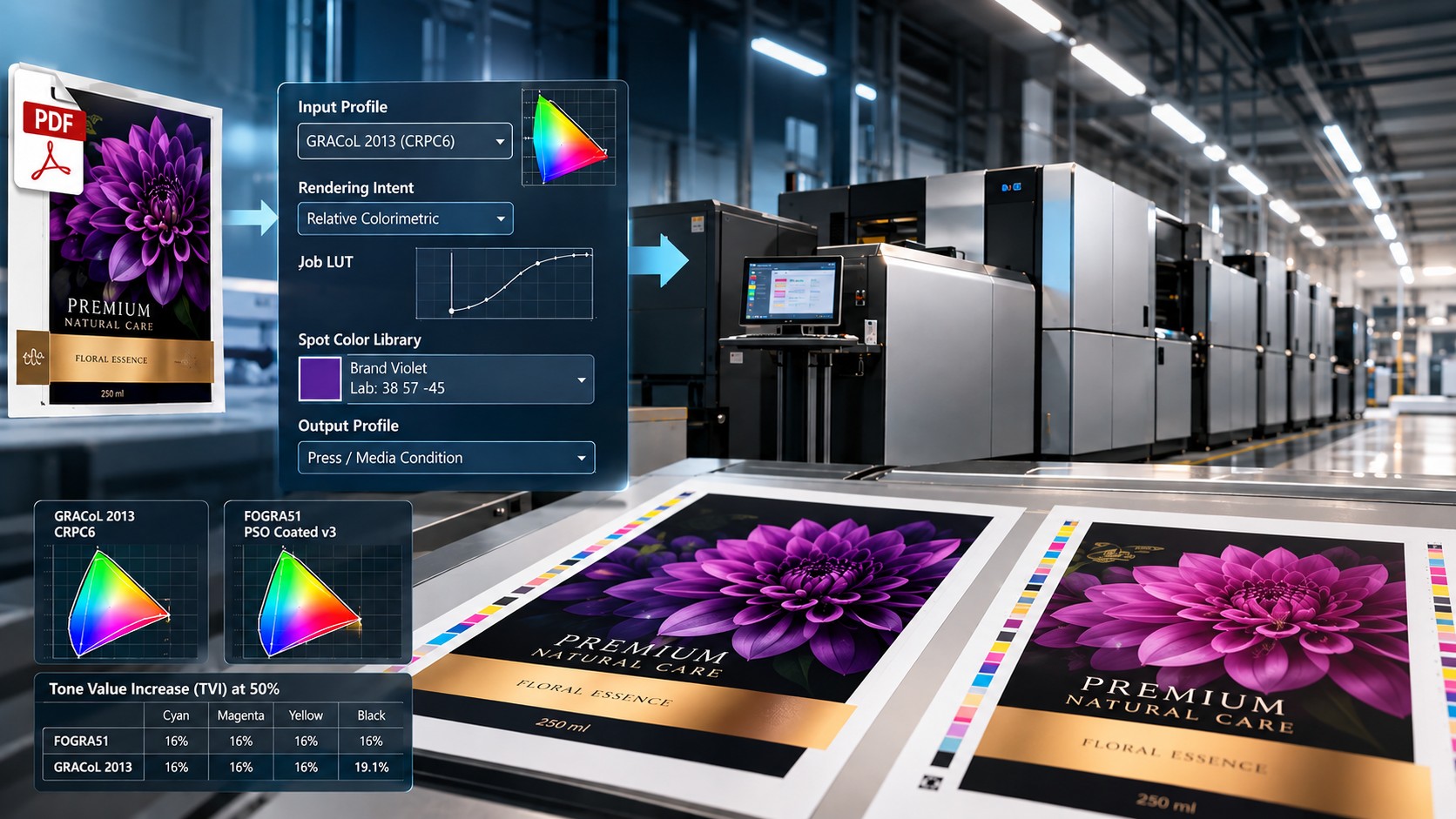
A DFE receives page descriptions and turns them into output data for the press. During that operation, it also decides how embedded and untagged colors are interpreted, which destination condition to simulate, how out-of-gamut colors are mapped, which spot-color recipes are used, and what separation and screening behavior is applied. Different configurations can produce different device values from the same input file.
A useful conceptual chain is source artwork → source-color interpretation → color conversion and gamut mapping → device separation → tonal and screening control → calibrated press → printed result. Real systems may combine these functions in device-link profiles or other integrated processing engines; you must verify the actual order of operations rather than assume it.
Successful repeat production therefore requires two preserved conditions: the physical press-and-substrate state and the complete digital processing recipe. An archived PDF alone preserves only the first part of the question: what was submitted, not necessarily how it was printed.
First, identify what the incoming color values mean.
A packaging PDF may contain RGB photographs, tagged CMYK illustrations, named spot colors, and untagged CMYK objects on the same page. CMYK percentages are not universal colors. Their appearance depends on the reference process and the profile used to interpret them. A CMYK combination created for one offset condition can represent a different color under another condition, even though its numerical values remain identical.
An embedded ICC profile describes how to interpret tagged color data. For untagged objects, the DFE requires an explicit, documented default policy. Changing that policy, ignoring an embedded profile, or assigning a different source profile can change the translated colors before any ink reaches the substrate. Operators should confirm whether a profile is embedded, assigned, converted, or deliberately passed through; these actions are not equivalent.
The PDF/X output intent helps communicate an intended printing condition and reduces file-exchange ambiguity. It is not proof that the DFE used the intended conversion, that the destination profile matches the installed substrate, or that the final print meets the approved color tolerances.
The reference condition and the digital press profile play different roles.
A source or reference characterization expresses what the incoming colors are intended to look like. A destination profile characterizes the response of the actual printing system under a particular ink set, substrate, screening configuration, and calibration state. Matching a conventional printing condition on a digital press requires a validated transformation between these two descriptions, not simply loading a familiar profile name.
Some workflows convert through a profile connection space, while others use CMYK-to-CMYK device links to preserve selected separation characteristics or improve press-to-reference matching. Their performance depends on the characterization data and the intended reproduction behavior. A device link created for one source condition or media fingerprint must not be silently reused after those conditions change.
FOGRA, GRACoL, and G7: related workflows, different references
Both FOGRA and GRACoL are widely used in professional color-managed production, but the names identify different reference datasets and printing conditions. Neither label, by itself, describes every physical press or certifies a job. The exact version must be specified when artwork is prepared and again when it is processed for repeat production.
FOGRA51 is associated with the PSO Coated v3 profile and a premium coated offset printing condition under ISO 12647-2:2013. Its nominal 50% tone is associated with approximately 16 percentage points of Tone Value Increase (TVI) for each of the four CMYK process channels. FOGRA39 is an older coated reference with a different characterization and tone-response condition; replacing it automatically with FOGRA51 is a production change.
GRACoL 2013, also known as CRPC6, is a characterized reference printing condition in the CGATS.21 / ISO 15339 family. Its registered profile identifies approximately 16 percentage points of TVI at 50% for Cyan, Magenta, and Yellow, and 19.1 for Black. GRACoL 2006 is a legacy characterization and should not be silently substituted by GRACoL 2013.
G7 is a calibration and process-control methodology that emphasizes the Neutral Print Density Curve (NPDC) and gray balance. It is associated with GRACoL workflows but is not the same thing as selecting a GRACoL input profile. A file interpreted using GRACoL characterization data does not establish that the physical press has undergone G7 calibration or qualification.
Reference condition | Characterization/profile | 50% tone reference |
|---|---|---|
FOGRA51 | PSO Coated v3 / ISO 12647-2:2013 | TVI: C, M, Y, K ≈ 16% |
GRACoL 2013 | CRPC6 / CGATS.21 / ISO 15339 | TVI: CMY ≈ 16%; K ≈ 19.1% |
Legacy references | FOGRA39 and GRACoL 2006 | Different datasets; do not substitute without verification |
These percentages describe the characterized reference response, not values to type directly into a Job LUT. They help explain why two apparently similar coated-printing references can produce different results, particularly in neutrals and black-related tone reproduction.
If a repeat job originally used GRACoL 2013 but is now interpreted using FOGRA51, midtones, grays, secondary colors, or overprints may differ even if the press remains calibrated. The corrective action is to restore the original approved source condition, conversion path, and associated job settings, then verify the output. The same principle applies when switching from a legacy reference to a newer one.
Job LUTs: when a useful curve becomes a double correction
A LUT maps input tone values to adjusted values. It can be part of a press calibration, a color-conversion operation, or an additional job-level appearance adjustment. These roles must be kept separate. A calibrated press may contain substantial internal tonal compensation even when the Job LUT is set to Linear.
When a workflow does not include a standard-input transformation that supplies the intended tonal appearance, an approved Job LUT may be used to simulate a selected dot-gain condition. For example, an aim of roughly 14 percentage points TVI at a nominal 50% tone corresponds to a printed effective tone near 64% under the defined measurement conditions. That is a measured output aim, not a universal LUT entry.
When a standardized input condition such as FOGRA or GRACoL is selected, and the validated DFE color strategy already accounts for the intended tone response, the additional Job LUT should be Linear if that is the documented workflow configuration. Applying a second dot-gain curve can darken midtones, change neutral balance, and alter overprints through double tonal compensation. An ICC profile alone does not guarantee that this is how every DFE processes tone; the complete pipeline must be qualified.
Changing a Job LUT after color characterization or approval can also invalidate the relationship assumed by an existing profile or spot-color recipe. The safest rule is not "always use Linear" or "always add dot gain," but "apply the required tonal transformation exactly once at the intended stage, and preserve that decision with the job."
Spot colors, rendering intent, and multicolor separation
A named spot color may resolve to a measured CIELAB target, a stored process recipe, a substrate-specific refinement, or a dedicated ink channel. Two DFE queues can use the same name while referencing different library versions or separation rules. When one brand color differs but process-color images are close, compare the approved Lab aim, active recipe, library version, and refinement history before attempting to correct the whole press.
Rendering intent and gamut mapping also influence the outcome. Relative colorimetric conversion and perceptual conversion can make different compromises when source colors lie outside the destination gamut. The difference may be most apparent in photographs, gradients, and saturated colors. Black-point compensation, black generation, Gray Component Replacement (GCR), and total colorant limits can further alter neutral appearance and shadow detail.
In expanded-gamut systems, enabling additional Orange, Violet, or Green channels changes the set of possible ink recipes. A different multicolor separation engine or screen configuration may reproduce a similar average color with a different dot structure, colorant balance, or overprint response. The approved ink set, separation method, and screening should therefore be versioned alongside profiles and LUTs.
Troubleshooting: prove where the color difference was introduced
Troubleshooting should protect a sound calibration, not overwrite it. Start by comparing the original approved sample with the repeat sample under the same measurement conditions. Review whether the discrepancy is global, limited to midtones, confined to spots, or localized to certain image types. That pattern determines where to investigate first.
1. Confirm the press is a valid comparison platform
Verify the current substrate and batch, ink configuration, screen, media definition, solid-density response, and calibration status. Check for transfer defects or unusual spatial nonuniformity. Use the same measurement instrument conditions, backing, and evaluation lighting as the original approval. If the press is physically unstable, address that issue before drawing conclusions about the DFE. Do not perform a full recalibration merely because the repeat looks different.
2. Compare the original and current job tickets
Confirm that the PDF revision is identical, preferably using a file checksum or controlled archive. Compare the embedded-profile policy, defaults for untagged data, declared reference condition, destination profile, device-link selection, rendering intent, black-point compensation, Job LUT, spot library and recipes, screening, white-ink handling where relevant, and image-enhancement settings. Review values inherited from hot folders, queue presets, and global defaults, not only those displayed in the job window.
3. Isolate one suspect transformation at a time
Hold the press calibration, substrate, and job content constant. Restore one mismatched DFE setting to its archived value, reprocess the job as required by that DFE, and print the same test regions. Measure both samples. If the discrepancy follows the changed setting, the evidence supports a digital-processing cause. Changing several parameters simultaneously may achieve a visually acceptable print but makes the root cause untraceable.
4. Restore the approved processing recipe
If source interpretation changed, restore the original input condition and embedded-profile policy. If a FOGRA/GRACoL reference or destination characterization changed, restore the validated reference-to-device transformation. If tone curves are duplicated, remove the unintended additional Job LUT correction. If a spot color differs, recover the approved target and recipe. Do not recreate an archived color by arbitrary slider adjustments unless the original approved configuration is genuinely unavailable and the job is being requalified.
5. Verify the correction and protect the next repeat
Evaluate process solids, representative CMYK halftones, neutral patches, critical spot colors, gradients, and production graphics. Record ΔE00 results against the same agreed reference, as well as visual differences that patch averages may not reveal. Approve production only after the corrected test demonstrates a stable match. Archive the restored ticket and measurements so the next job doesn't depend on an operator's memory.
Troubleshooting at a glance
Observed symptom | First DFE check | Action to verify |
|---|---|---|
Whole image warmer, cooler, or duller | Input profile; tagged / untagged policies | Restore approved interpretation and compare |
Midtones darker; solids nearly unchanged | Job LUT and tonal conversion | Check for an extra TVI curve; test Linear if specified |
Neutral gray casts or black tone changes | GRACoL / FOGRA reference; GCR; gray settings | Restore reference and separation settings |
One named brand color differs. | Spot library, target, and refinement | Recover approved recipe and measure Lab. |
Photographs differ; solids appear close | Rendering intent; black point; enhancements | Compare source-to-output conversions |
One DFE queue differs from another. | Queue presets; inherited global defaults | Run matched test tickets through both |
Differences persist with identical DFE settings. | Substrate, measurement, or press state | Investigate physical process and recalibration needs. |
Case example: a GRACoL repeat routed through another queue
A label job is approved with GRACoL 2013 as its source reference, a destination characterization qualified for the selected substrate, and a Linear Job LUT. On the repeat order, the same PDF is imported through a general-purpose queue. The operator notices a darker neutral image and a different violet brand color, while the process solids remain within their normal control range.
The audit shows that the second queue uses a non-linear Job LUT and a different spot-color library. The active source reference must also be checked: if the queue substitutes FOGRA51, that is an additional, independent change to the intended color interpretation. Rather than recalibrating the press, the team restores the approved reference conversion and Linear Job LUT, then separately reinstates the approved violet recipe.
Verification prints show whether each restored element contributes to recovery. The final match is assessed against the retained approved sample and its measurement report. This is a controlled example, not a claim that any one of these settings will produce an identical symptom on every DFE. Its point is procedural: test the digital cause before altering a physically stable system.
Design an archive that can actually reproduce color.
A production-ready archive should include the final PDF and its verified processing recipe: the exact input and output profiles or device links, reference version, queue or job ticket, intent, Job LUT, spot recipes, separation and screening, ink set, media definition, and the approved sample or measured target. Presets should be version-controlled so later defaults cannot silently replace the original values.
Repeat jobs should use a preflight comparison against the approved settings before release. Where a new profile, software version, substrate, or ink set requires a change, the job should be explicitly requalified rather than presented as an unchanged reproduction. PDF/X improves file-exchange discipline, but the actual color result still depends on correct DFE interpretation and an appropriately calibrated press.
The strongest workflow has two linked records: what colors the file was intended to represent and exactly how those colors were reproduced. Together they turn a repeat job from a reconstruction exercise into a controlled manufacturing process.
Engineering conclusion
The same PDF does not guarantee the same printed color. A DFE can produce different separation and tonal commands when source profiles, reference conditions, rendering, Job LUTs, spot recipes, or screening settings change. A calibrated press may reproduce those changed commands faithfully while producing a result that no longer matches the original approval.
Effective troubleshooting begins by establishing the approved color-processing path, comparing it with the current job, and testing the discrepancy under a stable printing condition. Full press recalibration becomes appropriate only when the physical system or its defined calibration state has actually moved outside the required condition.
Repeatable color requires the approved artwork, the approved digital processing recipe, and the same qualified physical printing condition.
Sources and technical references
- International Color Consortium (ICC). ICC specifications, profiles and color-management architecture. https://www.color.org/icc_specs2/
- ICC Profile Registry. PSO Coated v3 (FOGRA51) characterization, including CMYK 50% TVI. https://registry.color.org/profile-registry/PSOcoated_v3
- ICC Profile Registry. GRACoL2013 CRPC6 characterization and CMY/Black TVI values. https://registry.color.org/profile-registry/GRACoL2013_CRPC6
- PRINTING United Alliance. GRACoL reference conditions and associated G7 / ISO 15339 datasets. https://www.printing.org/library/standards/specifications-for-print-production/gracol
- Fogra. Characterization data and reference printing conditions. https://fogra.org/en/downloads/work-tools/characterisation-data
- Fogra. ProcessStandard Digital (PSD), digital-printing color fidelity and process control. https://fogra.org/en/certification/digital-printing/psd
- Technical color-management guide CA394-03841 (2015), provided for review. Historical, platform-specific instructions for source-profile emulation, media characterization, Job LUTs, and repeatability.
Technical qualification: Handling of embedded profiles, application of Job LUTs, device-link processing, available color channels, and calibration procedures vary across DFE architectures and printing platforms. Numeric TVI values stated here describe reference-characterization behavior, not universally applicable manual LUT values. The production configuration must be validated for the actual press, substrate, and workflow.